
政府的案子都爛爛的

#jackoo

前情提要

夢回 2020 VR 開發(下) 裡說到關於中控插件的事情,最近結案時被指出相關機能有問題,說是會閃屏與無法輸出畫面。

打從一開始,我就非常藐視這個中控軟體,為了解決畫面擷取就用了一大個黑盒子插件,重新封裝的源代碼也完全沒有進行版控(也許有,但如果有,也應該是提供 git 連結,而非打包好的 unitypackage)。

這篇就來說說到底經歷了甚麼 💩,怎麼火氣又上來了。

可能有人覺得是我故意要黑,把人家邏輯改醜了,但我沒那麼無聊。

事先聲明,底下的代碼除了調整縮排與刪除無關邏輯(更改 UI 等表現層部分),就是原始代碼的樣貌

生結案報告這件事情也讓我很賭爛是另一回事。。。

架構

先談談誰是誰,實現傳輸畫面的機能,要拆兩半:

  1. 中控插件 - Client 端,由 VR 教材開發者負責包進程式內
  2. 中控軟體 - Server 端,是已經封裝好的執行檔

因為 2 是固定的,所以 1(我們)要配合 2(計畫方)。

架構是這樣的,所有的 VR 頭顯都是 Client 端,指向 Server 端的中控軟體(黑盒子插件有自動網路發現的功能),綁定正確的 port 就能傳輸。

黑盒子插件本身是透過 UDP 進行傳輸,可以先忽略掉包的問題,因為如果把掉包也考慮進來,這個中控軟體根本就不算穩定運作。

中控軟體有一對一、一對多兩個模式,但一對一模式並不代表最大連線數量為 1

大意了沒有閃

計畫方提供的教學文件上指出,要把一個腳本放到場景中。

到這裡是我的問題,我沒有仔細看,該腳本是透過解析 Server 傳過來的封包,控制傳給 Server 畫面的解析度。

以下是解析封包與更改解析度的主要源碼:

🐘
  • sendScreenWsendScreenH 為目標解析度,公開靜態變數,供後續使用
  • ScreenWidthScreenHeight 為螢幕的原解析度,私有變數(啟動後便不再更動,基本上是 readonly,但使用 Unity 生命週期不好實作唯讀)
  • _string 參數是經過黑盒子插件編碼後的字串

screen 可以對照後面 Server 的流程圖。

ResolutionController.cs
1
2
3
4
5
6
7
8
9
10
11
12
13
14
15
16
17
18
19
20
21
22
23
24
25
26
27
28
29
30
31
32
33
34
35
36
37
38
39
40
41
42
43
44
45
46
47
48
49
50
51
52
53
54
55
56
57
58
59
60
61
62
63
64
public void Action_ProcessStringData(string _string)
{
string[] sData;

sData = _string.Split(' ');
if (sData[0] == "screen1")
{
if (int.Parse(sData[1]) > ScreenWidth)
{
sendScreenW = ScreenWidth;
}
else
{
sendScreenW = int.Parse(sData[1]);
}

if (int.Parse(sData[2]) > ScreenHeight)
{
sendScreenH = ScreenHeight;
}
else
{
sendScreenH = int.Parse(sData[2]);
}
}
else if (sData[0] == "screen2")
{
if (int.Parse(sData[1]) > ScreenWidth)
{
sendScreenW = ScreenWidth;
}
else
{
sendScreenW = int.Parse(sData[1]);
}

if (int.Parse(sData[2]) > ScreenHeight)
{
sendScreenH = ScreenHeight;
}
else
{
sendScreenH = int.Parse(sData[2]);
}
}
else if (sData[0] == "screen3")
{
sendScreenW = 512;
sendScreenH = 288;
}
else if (sData[0] == "screen4")
{
pairLabel = int.Parse(sData[1]);
}
else if (sData[0] == "screen5")
{
sendScreenW = 100;
sendScreenH = 58;
}
// else if (sData[0] == <other data>)
// .
// .
// .
}

有的邏輯是相同的,但還是堅持要把條件寫進去。

至於為甚麼要調整解析度,主要是避免炸頻寬,當初我還沾沾自喜,想說用 Graphic.Blit() 的方式,解析度可好了,到頭來還是逃不過降解。

我也沒辦法測試極限情況,畢竟沒那麼多台裝置嘛,但計畫辦公室總有辦法的,我應該要相信他們測試過後的數值
🤘🥳🤘

另外可以細品更改解析度是怎麼實現的:

Destroy?
  • rt 是目標 RenderTexture,快取成員變數
  • renderResolution 是解析度,為 Vector2 成員變數(但像素不會有浮點,基本上會使用 Vector2Int),根據 Server 傳來的封包更改值
GameViewEncoder.cs
1
2
3
4
5
6
7
8
9
10
11
12
13
14
15
16
17
18
19
20
21
22
23
if (renderResolution.x <= 1) renderResolution.x = 1;
if (renderResolution.y <= 1) renderResolution.y = 1;

bool IsLinear = (ColorSpace == ColorSpace.Linear) && (CaptureMode == GameViewCaptureMode.FullScreen);

sourceDescriptor.width = Mathf.RoundToInt(renderResolution.x);
sourceDescriptor.height = Mathf.RoundToInt(renderResolution.y);
sourceDescriptor.sRGB = !IsLinear;

if (rt.width != sourceDescriptor.width ||
rt.height != sourceDescriptor.height ||
rt.sRGB != IsLinear)
{
DestroyImmediate(rt);

try { rt = new RenderTexture(sourceDescriptor); }
catch
{
DestroyImmediate(rt);
rt = new RenderTexture(sourceDescriptor.width, sourceDescriptor.height, 16, RenderTextureFormat.ARGB32);
}
rt.Create();
}

更改解析度時會 Destroynew() 一個新的 RenderTexture,極端情況下頻繁銷毀建立物件,就怕 GC 搞你。

基本上,RenderTexture 是向 GPU 申請記憶體來操作,如果只是調整解析度,可以考慮使用 RenderTexture.Release() 以及 RenderTexture.Create() 來實現 GPU 上的記憶體釋放與建立。

代碼混淆界的翹楚

由於我實在搞不懂為啥一定要綁定溝通的腳本,所以我用 UnityExplorer 以及 dnSpy 還原了場景與源碼。

話先說在前面,我並不認識原作者,但我必須說,拉了一坨大的。

先來看看核心的邏輯腳本,當中的 Update() 方法:

答辯
  • FMNetworkManager 是黑盒子插件封裝出來的應用層
    • SendToTarget() 傳送封包到指定 ip
    • SendToOther() 傳送封包給所有連上的 Client
FMStatic.cs
1
2
3
4
5
6
7
8
9
10
11
12
13
14
15
16
17
18
19
20
21
22
23
24
25
26
27
28
29
30
31
32
33
34
35
36
37
38
39
40
41
42
43
44
45
46
47
48
49
50
51
52
53
54
55
56
57
58
59
60
61
62
63
64
65
66
67
68
69
70
71
72
73
74
75
76
77
78
79
80
81
82
private void Update()
{
if (FMStatic.ServerOK)
{
if (FMStatic.screenW != Screen.width || FMStatic.screenH != Screen.height)
{
FMStatic.screenW = Screen.width;
FMStatic.screenH = Screen.height;
this.NowscreenH = FMStatic.screenH;
this.NowscreeW = FMStatic.screenW;
FMStatic.checkConnectionCase = 0;
this.sendScreenCase = 0;
this.NowConnectNum = FMStatic.connectCount;
}
if (this.NowConnectNum != FMStatic.connectCount && FMStatic.connectCount >= 1)
{
FMStatic.checkConnectionCase = 0;
this.NowConnectNum = FMStatic.connectCount;
}
else if (this.NowConnectNum != FMStatic.connectCount && FMStatic.connectCount == 0)
{
this.NowConnectNum = FMStatic.connectCount;
}
if (FMStatic.caseNow == 0 && FMStatic.checkConnectionCase == 0)
{
FMStatic.checkConnectionCase = 1;
}
else if (FMStatic.caseNow == 1 && FMStatic.checkConnectionCase == 0 && this.Group3Case == 0)
{
FMNetworkManager.instance.SendToOthers("screen3");
for (int i = 0; i < FMStatic.connectCount; i++)
{
this.sendTextScreen = "screen4 " + (1001 + i).ToString();
string targetIP = FMStatic.connectIP[i];
FMNetworkManager.instance.SendToTarget(this.sendTextScreen, targetIP);
}
FMStatic.checkConnectionCase = 1;
}
if (FMStatic.connectIP[0] != "" && this.sendScreenCase == 0 && FMStatic.caseNow == 0)
{
this.sendScreenCase = 1;
this.sendTextScreen = "screen1 " + this.NowscreeW.ToString() + " " + this.NowscreenH.ToString();
FMNetworkManager.instance.SendToTarget(this.sendTextScreen, FMStatic.connectIP[0]);
}
else if (FMStatic.connectIP[0] != "" && this.sendScreenCase == 4 && FMStatic.caseNow == 0)
{
this.sendScreenCase = 1;
this.sendTextScreen = "screen1 " + this.NowscreeW.ToString() + " " + this.NowscreenH.ToString();
FMNetworkManager.instance.SendToTarget(this.sendTextScreen, FMStatic.connectIP[0]);
}
else if (FMStatic.connectIP[0] != "" && this.sendScreenCase == 0 && this.Group3Case == 0 && FMStatic.caseNow == 1)
{
this.sendScreenCase = 1;
FMNetworkManager.instance.SendToOthers("screen3");
for (int j = 0; j < FMStatic.connectCount; j++)
{
this.sendTextScreen = "screen4 " + (1001 + j).ToString();
string targetIP2 = FMStatic.connectIP[j];
FMNetworkManager.instance.SendToTarget(this.sendTextScreen, targetIP2);
}
}
else if (FMStatic.connectIP[0] != "" && this.sendScreenCase == 0 && this.Group3Case == 1 && FMStatic.caseNow == 1)
{
this.sendScreenCase = 1;
this.sendTextScreen = "screen1 " + this.NowscreeW.ToString() + " " + this.NowscreenH.ToString();
FMNetworkManager.instance.SendToTarget(this.sendTextScreen, FMStatic.destIP);
}
else if (FMStatic.connectIP[0] != "" && this.sendScreenCase == 5 && FMStatic.caseNow == 1)
{
this.sendScreenCase = 1;
FMNetworkManager.instance.SendToOthers("screen5");
this.sendTextScreen = "screen2 " + this.NowscreeW.ToString() + " " + this.NowscreenH.ToString();
FMNetworkManager.instance.SendToTarget(this.sendTextScreen, FMStatic.destIP);
this.sendTextScreen = "screen4 2001";
FMNetworkManager.instance.SendToTarget(this.sendTextScreen, FMStatic.destIP);
}
// else if (warnCase)
// .
// .
// .
}
}

可以看得出來,作者想用幾個 State 變數來作流程判斷:

  1. caseNow
  2. checkConnectionState
  3. sendScreenCase
  4. Group3Case

跟前面一樣,乍看之下根本不知道這些邏輯在做啥。

由於是反編譯 DLLC# 編譯為 IL Code 時會把 Enum 轉換成對應數值。所以開發時到底有沒有使用 Enum 來管理這些 Magic Number 是不可考的。

精簡過後,沒事,圖來了:

傳給 Clientscreen 封包使用斜體標示:
all = 傳給所有 Client
target = 傳給目標 Client

stateDiagram-v2
state Server {
    [*] --> 等待連線

    等待連線 --> Update: ServerOk is True

    state Update {
        [*] --> 檢查連線數

        檢查連線數 --> [*]: 連線數為 0
        檢查連線數 --> 一對一: caseNow is 0


        檢查連線數 --> 一對多: caseNow is 1

        一對一 --> [*]
        一對多 --> [*]
    }
}
stateDiagram-v2
state 一對一 {
    r1 : target - __*screen1 [w] [h]*__
Client 使用指定解析度 [*] --> r1: 連線變動
or
收到 Client 封包 [*] --> [*] r1 --> [*] }
stateDiagram-v2
state 一對多 {
[*] --> 傳送初始化資料: 連線變動
state 傳送初始化資料 {
    init_medium : all - __*screen3*__
Client 使用中解析度 init_pair : all - __*screen4 [id]*__
Client 配對 ID [*] --> init_medium init_medium --> init_pair init_pair --> [*] } checkWindow : 檢查窗口變動 傳送初始化資料 --> checkWindow [*] --> checkWindow: 連線無變動 checkWindow --> 變小窗模式 state 變小窗模式 { medium : all - __*screen3*__
Client 使用中解析度 pair : all - __*screen4 [id]*__
Client 配對 ID [*] --> medium medium --> pair pair --> [*] } checkWindow --> 變大窗模式 state 變大窗模式 { small : all - __*screen5*__
Client 使用小解析度 large : target - __*screen2 [w] [h]*__
Client 使用指定解析度 [*] --> small small --> large large --> [*] } checkWindow --> [*]: 無變動 變小窗模式 --> [*] 變大窗模式 --> [*] }

這個流程圖可能給小學生用 Scratch 都能拉出來,更不用說原本的邏輯實現可能還有 bug 存在,完全沒經過重構,這就是想到啥寫啥的經典案例。

2025/08/20 更新:其實不是大中小解析度,那只是寫死的數值傳給 Client 端檢查用的。

歸納一下問題

可以先解說一下,解碼器是透過在封包開頭的 id 來決定是否要繼續解碼資料。

回到之前所說,一對一並不是最大連線數目為 1 的問題,就是因為這樣,所以多個用戶傳入的封包都被解碼並指定到 Texture UI 上,才導致閃屏。

由於黑盒子插件沒有提供最大連線數目的設定(儘管邏輯實現並不複雜),基本上應該要通知後續連入的 ClientServer 沒在理他,雖然單看 Server 端的程式碼,似乎沒有對這方面做對應。

至於一對多,有前面提到的 screen4 [id] 封包可以綁定,把該封包解密並將 id 指定到編碼器上,基本上就不會出現這個問題。

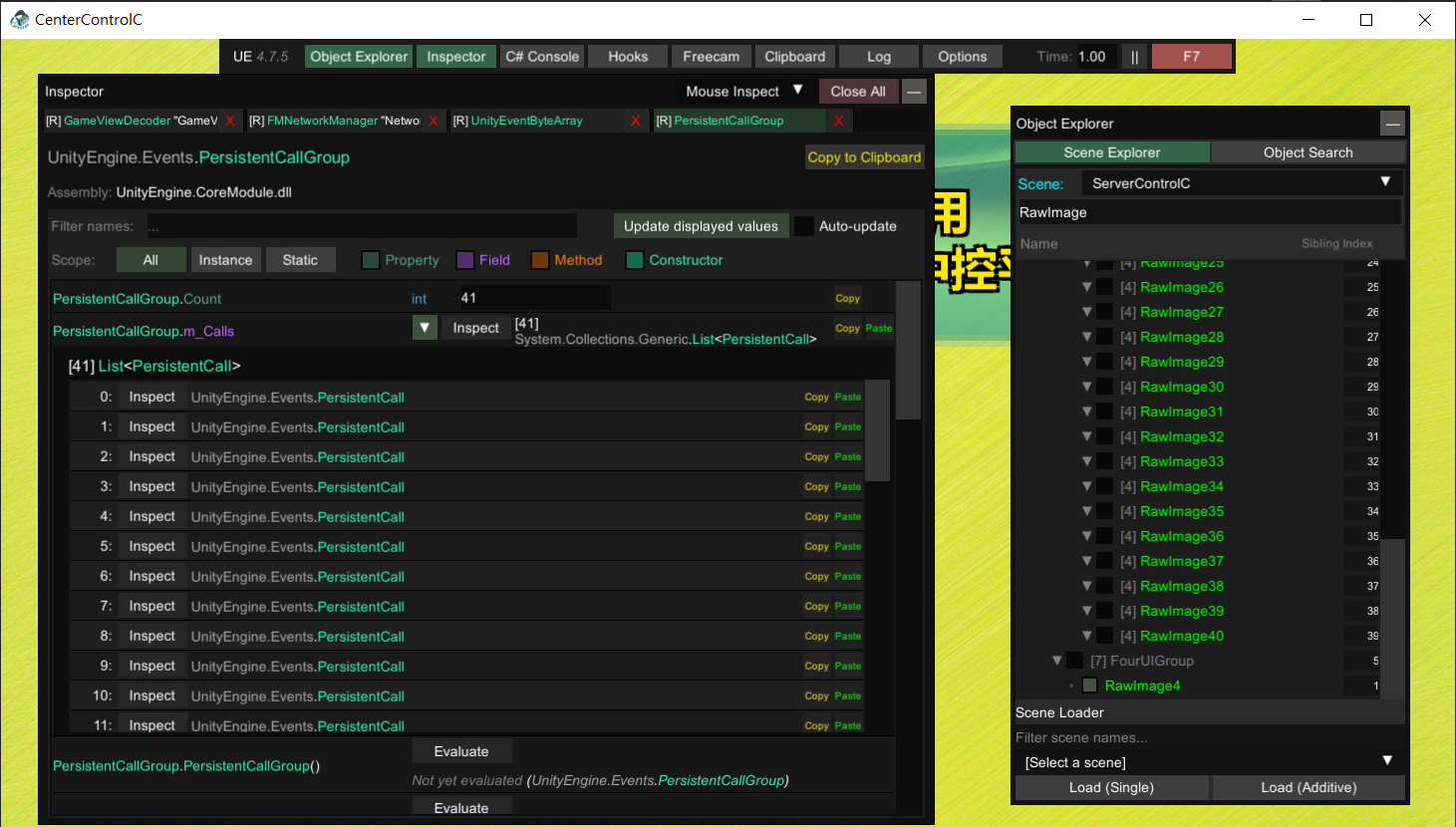
但是話又說回來,把接收到的封包傳給所有的解碼器,這本來就不是啥好作法,更不用說他將觸發綁在 Unity 場景上(Persistant Event Call)。
image

40 個小窗 + 1 個大窗,共 41 個事件綁定

好一點的作法應該是只使用一個解碼器,解碼完成後再透過 Dictionary 或是更單純的容器用 Index 找到需要被渲染的 RawImage,不就少了很多次的 Convert

追求效能的極致

解碼轉換 id 使用 BitConvert.ToInt32,是 .net 提供的高級寫法,不過這種地方如果出現效能瓶頸,可以考慮 shifting 的方式。

Performance.cs
1
2
3
4
5
6
7
8
var arr = new byte[4];  // input bytes
var offset = 0;

int i1 = BitConvert.ToInt32(arr, offset);
int i2 = arr[offset + 0] << (0 * 8) |
arr[offset + 1] << (1 * 8) |
arr[offset + 2] << (2 * 8) |
arr[offset + 3] << (3 * 8);

是黑盒子不代表不能改

關於傳輸,底層代碼沒那麼複雜,更不用說黑盒子插件還是直接使用 .NET 提供的 UdpClient 實現通訊。

除去閃屏問題後,能改的地方還是太多了,簡單列下面幾個:

  1. 不要透過通知 id 來達成畫面配對,明明就有辦法取得 IP,用 IP 來決定用渲染到哪個 UI Texture 不香嗎
  2. UDP 環境,雙端都應該要定時 Heartbeat,才不會有意外發生
  3. C# ,請善用非同步
  4. 如果希望追求效能極致,減少 ArrayCopy,使用 SpanReadonlySpan 來做 Event Callback 比較好
  5. 一對一模式根本就沒有禁止其他 Client 傳資料給 Server(由於直接使用廣播),導致不能有效降低頻寬使用
  6. 對於 Parse、集合操作等等這些容易出例外的邏輯,都應該要捕捉例外,無論用 TryParse 或是直接寫 try catch

結論是啥

並不是說一定要寫狀態機,但全部的狀態都用 if else condition 來完成,不用 switch case,也沒有做任何方法封裝,純粹是給大家找麻煩而已。

另外,很多地方如果不想從外部呼叫方法,基本上都可以改用事件通知,但作者選擇放進 Update() 內用 Flag 逐幀判斷。

在撰寫程式碼時,基本上會在效能與可維護(可讀性)之間取捨,但從程式碼來看就是兩個都不要,既沒提升效能,也困難維護。

我常說寫程式要像搞藝術一樣慢慢雕,邏輯實現並不難,但要理解語言的特性並且活用語法糖;而 C# 作為一個先進的語言,反編譯了不少 Unity 遊戲,也是很久沒看到這種傷眼睛的東西了。

😋

有的時候覺得很厲害,在大家還在思考如何做代碼混淆的時候,作者在撰寫時就同時完成了邏輯的混淆。

留言